
Indexing Geta Categories in Optimizely Graph
Different ways to fully use categories in headless architecture.

The Geta Categories is an excellent package. It makes working with Taxonomy nice and intuitive. And it gives a huge flexibility as categories may contain whatever is needed. It also helps with search filtering. There is a small issue with it, though, which applies when working on the headless architecture with Optimizely Graph as the center point. The Geta Categories are not indexed in the Graph, which means that the schema doesn’t contain any created category types. Most importantly, when having a content reference to the category, its expanded object is null. Normally, it would contain all the category data as it does for other content types. Sadly, there is no simple switch or configuration option to add category type to the indexing register.
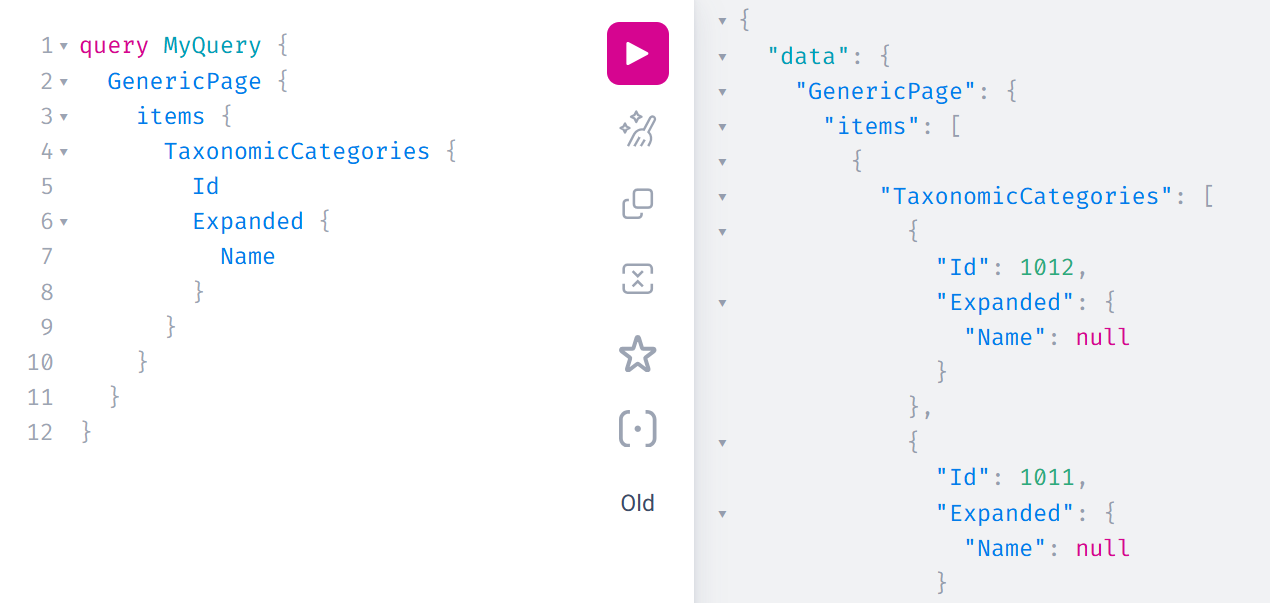
There is an issue that needs to be resolved. The front-end application still needs to know the name of the category or any of the essential data. What are the potential solutions?
REST API
The Graph still contains the most important part of the category data - its content reference. With this, FE can get the necessary information from an especially prepared API endpoint that would return category information based on the ID. Or it can return a complete set of data regarding all available categories that the FE app stores locally. However, this feels overwhelming. Additional HTTP call just to get a category name? Doesn’t look good…
Custom Graph property
There is a way to enrich Graph data with additional properties for specific content types. I borrowed this approach from the Optimizely Commerce code, which uses it to add information like pricing for the market or inventory data.
Essentially, the custom property must implement the ITypedContentApiModelProperty interface (but registering in DI as IContentApiModelProperty). It can quickly be noticed that every property would need to contain duplicated code for things like finding supported types. In that case, it’s good to prepare the base class first, containing all common functions.
internal abstract class CustomGraphPropertyBase<TGraphModel> : ITypedContentApiModelProperty where TGraphModel : notnull
{
    private readonly ContentTypeModelRepository _contentTypeModelRepository;
    private readonly Lazy<IEnumerable<Type>> _supportedTypes;

    protected IContentLoader ContentLoader { get; }

    protected CustomGraphPropertyBase(ContentTypeModelRepository contentTypeModelRepository, IContentLoader contentLoader)
    {
        _contentTypeModelRepository = contentTypeModelRepository;
        ContentLoader = contentLoader;

        _supportedTypes = new Lazy<IEnumerable<Type>>(ResolveSupportedTypes);
    }

    public Type[] ContentTypes => _supportedTypes.Value.ToArray();

    public object GetValue(ContentApiModel contentApiModel)
    {
        var guidValue = contentApiModel.ContentLink?.GuidValue;
        if (!guidValue.HasValue)
            return NoValue;

        try
        {
            var content = ContentLoader.Get<IContentData>(guidValue.Value, GetLanguage(contentApiModel.Language));
            return GetValue(content);
        }
        catch
        {
            return NoValue;
        }
    }

    public abstract string Name { get; }
    protected abstract IEnumerable<Type> GetSupportedTypes();
    protected abstract TGraphModel GetValue(IContentData content);
    protected abstract TGraphModel NoValue { get; }

    private HashSet<Type> ResolveSupportedTypes()
    {
        var typeSet = new HashSet<Type>();
        var supportedTypes = GetSupportedTypes().ToList();

        foreach (var contentTypeModel in _contentTypeModelRepository.List())
        {
            var modelType = contentTypeModel.ModelType;
            if (supportedTypes.Any(x => x.IsAssignableFrom(modelType)))
            {
                typeSet.Add(modelType);
            }
        }

        return typeSet;
    }

    private static CultureInfo GetLanguage(LanguageModel languageModel)
    {
        var langName = languageModel.Name;
        if (string.IsNullOrWhiteSpace(langName))
        {
            return CultureInfo.InvariantCulture;
        }

        try
        {
            return CultureInfo.GetCultureInfo(langName);
        }
        catch (CultureNotFoundException)
        {
            return CultureInfo.InvariantCulture;
        }
    }
}
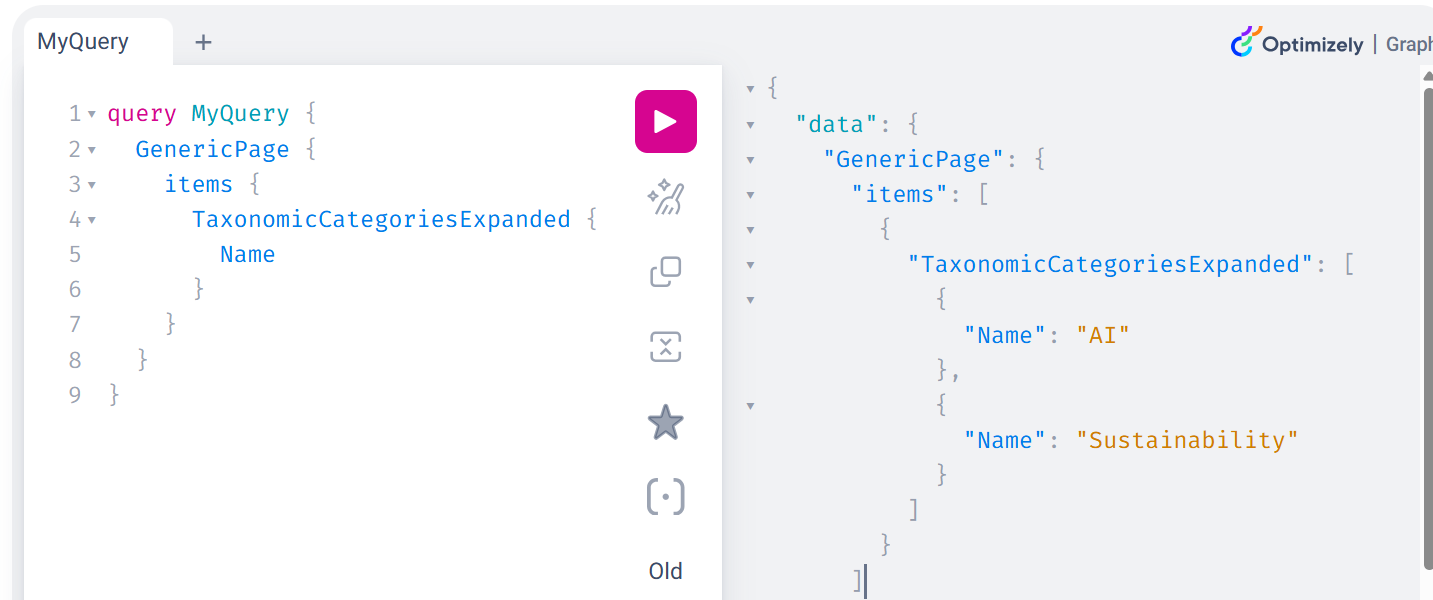
Having that, it is possible to create specific properties. For example, there might be a special interface, IHasTaxonomicCategories, that marks the content and forces it to contain necessary category properties. Then the custom property can be registered for interface implementations that add a new graph field - TaxonomicCategoriesExpanded, where all necessary data, like names and descriptions, can be found.
internal class TaxonomicCategoriesGraphProperty : CustomGraphPropertyBase<List<CategoryGraphModel>>
{
    private readonly ICategoryContentLoader _categoryLoader;

    public TaxonomicCategoriesGraphProperty(
        ContentTypeModelRepository contentTypeModelRepository,
        IContentLoader contentLoader,
        ICategoryContentLoader categoryLoader) : base(contentTypeModelRepository, contentLoader)
    {
        _categoryLoader = categoryLoader;
    }

    public override string Name => "TaxonomicCategoriesExpanded";

    protected override IEnumerable<Type> GetSupportedTypes()
    {
        yield return typeof(IHasTaxonomicCategories);
    }

    protected override List<CategoryGraphModel> GetValue(IContentData content)
    {
        if (content is not IHasTaxonomicCategories hasCategories)
        {
            return NoValue;
        }

        return hasCategories
            .TaxonomicCategories
            ?.Select(x => _categoryLoader.Get<CategoryData>(x))
            .Select(x => new CategoryGraphModel(x.Name))
            .ToList() ?? [];
    }

    protected override List<CategoryGraphModel> NoValue => [];
This works pretty well, but there is an important disadvantage. Any category change, like a name update, will not be automatically populated across all TaxonomicCategoriesExpanded fields. In order to see that update, all the content instances that contain this field must be reindexed.
This can also be fixed by connecting to appropriate content events, finding dependent content instances, and triggering the Graph reindex for them. I’ve been trying to avoid this flow, but it’s not always possible. This, however, is a topic for another post.
Registering category content type
There is another way that I have discovered recently, after some serious debugging. It’s possible to register a new content type, which in short means that all category types will be added to the Graph schema, and the expanded object will contain the desired data. It will simply work the same way as for other blocks, pages, and media. But there is a BIG RED flag here. It requires registering a code for services from internal Optimizely namespaces.
That being said, let’s deep dive into technical details. Graph resolving logic takes all the available content types from the content type repository, and it checks if the base type is allowed to be indexed. The first challenge here is that Geta categories don’t have any base type available in this data - it’s simply null. So the first step is to register it. Approaching it in a similar way to how commerce is registering base types for commerce types, it is enough to add a new structure item and register it with the provider. It simply maps our new CustomContentTypeBase structure to Geta CategoryData model.
using EPiServer.DataAbstraction.RuntimeModel;
using Geta.Optimizely.Categories;

internal static class CustomContentTypeBase
{
    /// <summary>
    /// Represents GETA Categories for Content Graph indexing.
    /// </summary>
    internal static readonly ContentTypeBase Category = new(nameof(Category));
}

internal class CustomContentTypeBaseProvider : IContentTypeBaseProvider
{
    private static readonly Dictionary<ContentTypeBase, Type> ContentTypeBasesMapping = new()
    {
        {
            CustomContentTypeBase.Category,
            typeof(CategoryData)
        }
    };

    public IEnumerable<ContentTypeBase> ContentTypeBases => ContentTypeBasesMapping.Keys;

    public Type? Resolve(ContentTypeBase contentTypeBase) =>
        ContentTypeBasesMapping.TryGetValue(contentTypeBase, out var type) ? type : null;
}
That's not enough, though. Now it is needed to tell Graph that this new base type can be indexed. And here is the place where internal code must be slightly aligned, because custom implementation for Optimizely.ContentGraph.Cms.NetCore.Internal must be added. It doesn’t do much, just adds a new item to the list.
internal class CustomContentSerializer : ContentSerializer
{
    public CustomContentSerializer(
        IContentConverterResolver contentConverterResolver,
        ContentApiOptions contentApiOptions,
        IContentTypeRepository contentTypeRepository,
        IContentGraphConverterContextFactory cgConverterContextFactory,
        IEnumerable<IContentApiModelFilter> contentApiModelFilters,
        ISiteDefinitionResolver siteDefinitionResolver,
        ContentGraphContextAccessor contentGraphContextAccessor,
        IOptions<QueryOptions> queryOptions,
        ConventionRepository? conventionRepository = null)
        : base(
            contentConverterResolver,
            contentApiOptions,
            contentTypeRepository,
            cgConverterContextFactory,
            contentApiModelFilters,
            siteDefinitionResolver,
            contentGraphContextAccessor,
            queryOptions,
            conventionRepository)
    {
    }

    public override string[] SupportedContentBaseTypes
    {
        get
        {
            var supportedTypes = base.SupportedContentBaseTypes.ToList();

            supportedTypes.Add(CustomContentTypeBase.Category.ToString());
            return supportedTypes.ToArray();
        }
    }
}
It’s not much of the custom logic. Just adding our new CustomContentTypeBase to the supported types dictionary. But still, it depends on many services injected into the constructor, which can easily be changed. And I already faced that after upgrading the Graph package - I had to fix compilation errors…
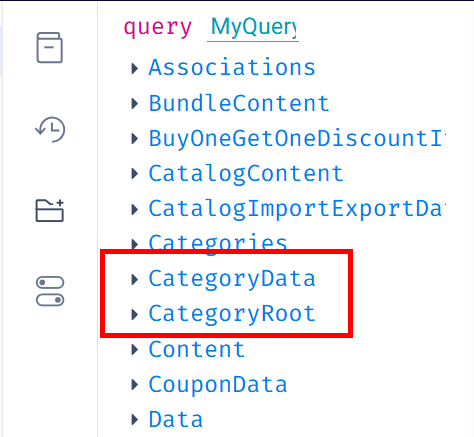
Having those, the final step is to register everything in the DI container. After that, the categories can be seen in the Graph schema explorer.
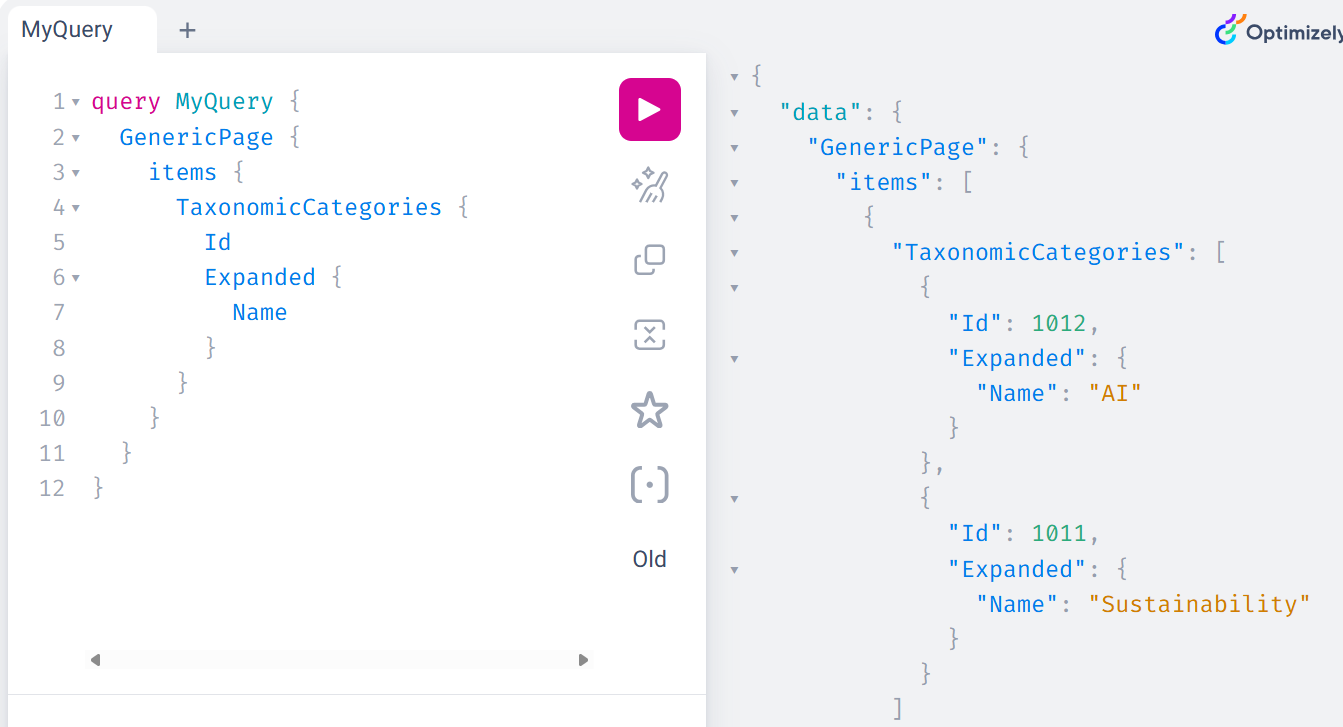
An expanded object contains the category details. What is also important here - it will be updated every time the actual category is updated.
Summary
Going into the headless architecture direction brings new challenges. One of them is to fully use the power of Geta Categories. In some cases, workarounds are necessary, like those described above. I truly believe that the most optimal way - registering a new content type to be indexed, will be fully supported in the near future.
More articles

The Entra ID Surprise
How assumptions can lead to mysterious issues.

Optimizely CMS Mixed Auth - Okta + ASP.NET Identity
Configuring mixed authentication and authorization in Optimizely CMS using Okta and ASP.NET Identity.

Cancelling CMS Scheduled Jobs
From flags to tokens: making Optimizely CMS scheduled jobs more elegant with .NET cancellation tokens.